
Record an actual reading
- Read the odometer on the vehicle’s dashboard.
- Open Settings → Vehicles and select that vehicle.
- Tap Add first reading or Add reading.
- Enter the reading in whole kilometres and set the Date and time when you observed it.
- Tap Save.
Use the observed reading, not the app’s estimated current value. In Logbook mode, you can also use Add odometer reading from Reports for the selected vehicle.
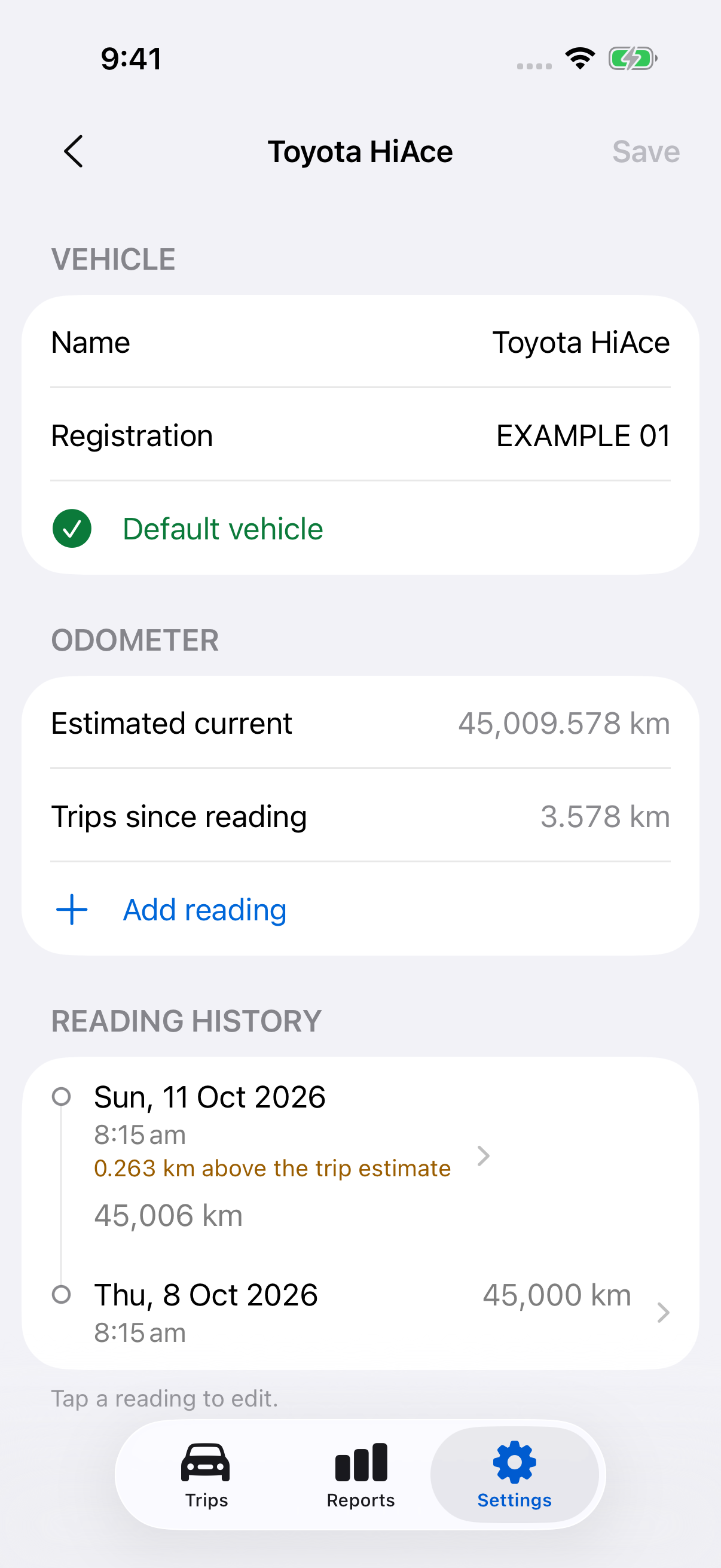
Correct a saved reading
- Open the vehicle’s detail screen.
- Under Reading history, tap the entry.
- Correct its value, date or time.
- Tap Save.
This updates the history entry. It does not change any trip’s saved distance. Correct a trip separately if its distance or vehicle is wrong.
Understand calculated estimates
Estimated current combines an actual reading with known trip distances since that reading. Trips since reading shows the contributing distance. Trip odometer estimates are calculations, not readings taken from the dashboard.
A difference at a later actual reading can indicate missing trips or incorrect data. Review the journeys and readings before making changes. Unavailable means the app cannot calculate a reliable value from the available records; it does not mean zero.
For a 12-week logbook, keep the actual observations required for your records. Check the period and annual odometer details in Reports; do not treat an estimate as an observation.
Still need help?
If you can’t find what you’re looking for, we’re here to help.
Contact us