
Choose a method
Open Settings → Rates and select a method. The selection saves immediately.
| Method | Use in LogMetric |
|---|---|
| Cents/km | Uses the Australian rate for the trip’s start date. The available rate table is read-only. |
| Logbook | Uses actual odometer readings to calculate business-use percentage in reports, without per-trip dollar estimates. |
| Custom | Uses your dated cents-per-kilometre rates for Business trip values. |
The selected method applies to trip estimates and Reports throughout the app. It does not change a trip’s classification.
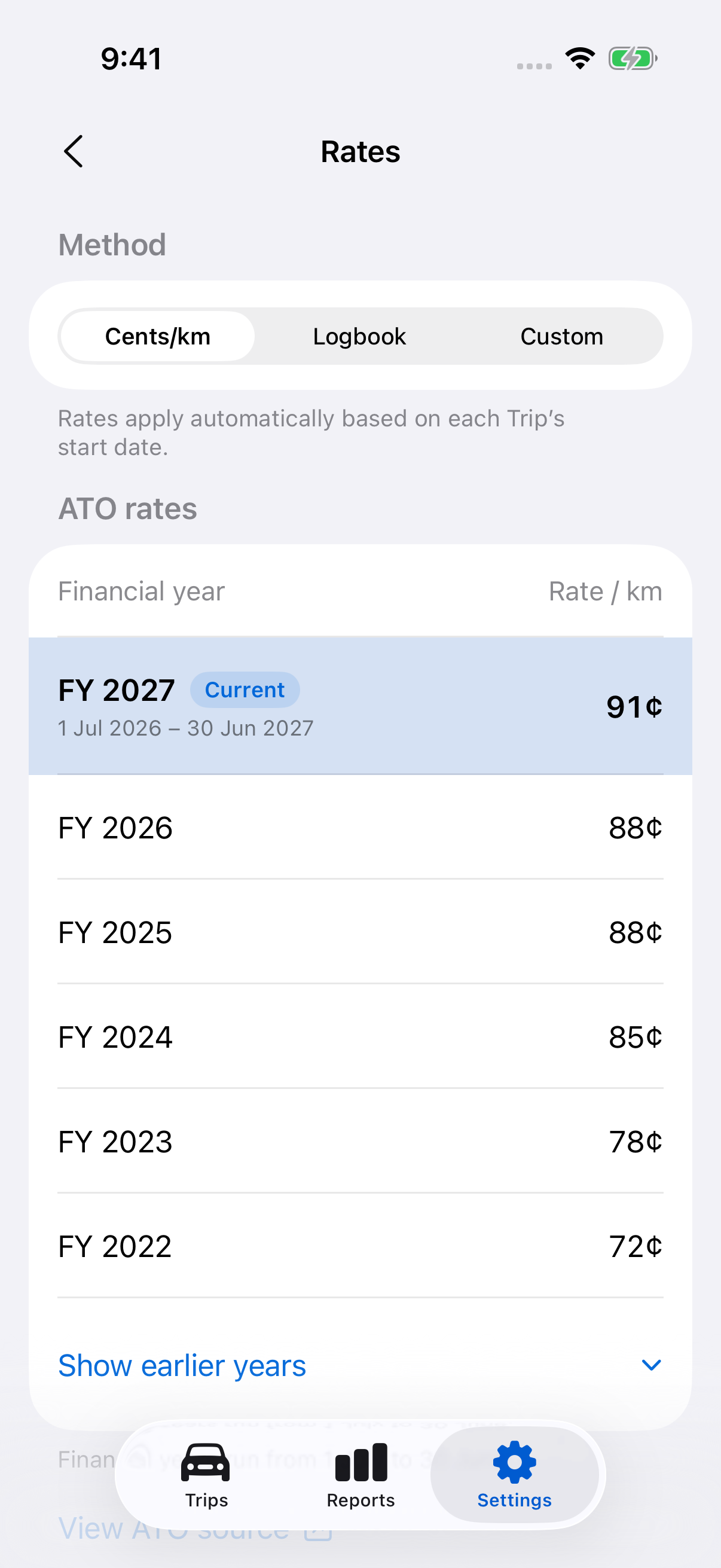
Check Australian rates
Select Cents/km to view rates by financial year. Use View ATO source to check the official ATO rate information.
Australian rates cannot be edited here. If a rate is unavailable for a trip’s date, the app shows the estimate as unavailable.
Add a custom rate
- Select Custom and tap Add custom rate.
- Set the Effective date.
- Enter Cents per kilometre, not dollars per kilometre.
- Tap Save.
Each effective date must be unique. A Business trip uses the latest rate effective on its start date, including a corrected start date. If no rate applies yet, its value is unavailable.
Edit or delete a custom rate
Tap an existing rate, change its effective date or amount and tap Save. To delete it, swipe left on the rate, tap Delete and confirm Delete rate.
Editing or deleting a rate can change estimates for past Business trips and newly generated reports. Review the affected dates after a change. Previously exported files remain copies of the settings used when they were generated.
Still need help?
If you can’t find what you’re looking for, we’re here to help.
Contact us